
How texture tile borders can be fixed?
We all know that Core Design never was able to implement mipmapping. Maybe they never done it because of cross-platform nature of classic TRs (that's what I always thought until now), but most likely they had major problems with texture tile border bug, which will inevitably appear, if textures are saved in a single texture set, and then got mipmapped as a whole, in one pass:
As you can see, problem lies not in wrong UV coordinates defined at engine-runtime, i. e. this is NOT a rounding error, not wrong texel alignment, etc. Problem is much more brutal and simple, it's just the nature of image resizing and filtering.
You can easily check out this problem, if you will force any classic TR engine to run with anisotropic filtering and/or FSAA forced through display driver. You will notice that every texture now have small outline colored similar to an adjacent texture in texture set. It even appears on objects and static meshes (mostly it's noticeable on Lara's skin and hair)
Only possible solution in this case is alternate mipmap generation behaviour:
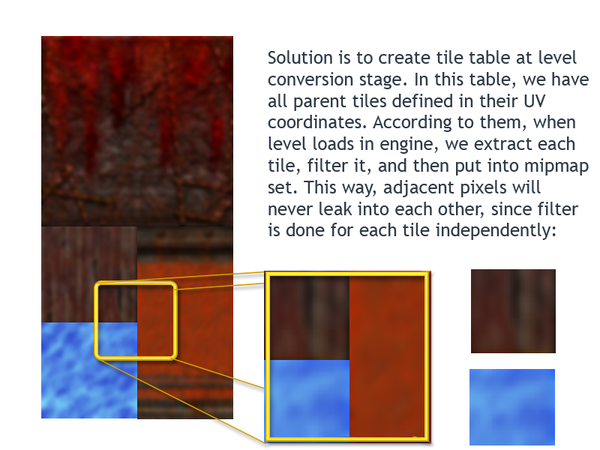
Now, what you need to do step-by-step:
On a map conversion stage in Map2QDT:
1. Scroll through all object, static mesh and room mesh faces' AND filter out tiles that are inside of other tiles (we don't need them, because filtering needs to be done only once for each zone), then save remaining tile UV mappings into same texture coordinate table. In pseudocode it can look like this:
var
FacesInLevel: array [0..<number of faces in level>] of <UV coordinates>;
TileTable: dynamic array of <UV coordinates>;
i, j: integer;
begin
For i:= 0 to Length(FacesInLevel) do begin
while j < Count(TileTable) do begin
if <FacesInLevel[i] rectangle belongs to TileTable[j]> then <expand TileTable[j] coordinates to inclute FacesInLevel[i]>;
else <create new TileTable entry and copy FacesInLevel[i] into it>;
end;
j:=0
End;
end;
This way, we can have only "parent" tiles defined in our table, which will include all children tiles that were possibly defined by user.
Same is done for all object / static mesh faces.
I suppose that all this process can be boosted by using binary quick sorting (qsortarray.pas unit). You simply sort all faces by coordinate increment, then filter out any tiles that have UV coordinates belonging to other tiles. Like this:
Face[1]: X1=0, Y1=0, X2=256, Y2=256
Face[2]: X1=32, Y1=32, X2=512, Y2=512 --> X1 and Y1 belongs to Face[1], but X2 and Y2 goes beyond Face[1], so we now need to EXPAND Face[1] X2 and Y2 to 512, and filter out Face[2].
Face[3]: X1=64, Y1=64, X2=128, Y2=128 --> filter this out, since it's completely inside Face[1].
Face[4]: X1=513, Y1=0, X2=1024, Y2=1024 --> X1 coordinate doesn't belong to Face[1], so this face won't be filtered out and gets into tile table
.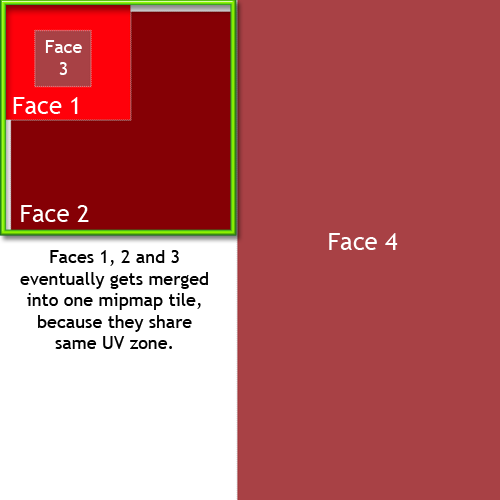
So, from these 4 Face tiles, we only have remaining Face[1], which gets X1=0, Y1=0, X2=512, Y2=512, and Face[4], which doesn't belong to Face[1] parent at all.
In picture above, you see that faces 1 and 3 are in the zone of face 2. That's why they all got merged into one mipmap tile.
And so on, until we'll filter out all children tiles. This may seem complicated and time-consuming, but remember that it should be only done on map conversion stage, engine itself will just generate mipmaps using texture coordinate table and will never check EVERY face at loading time. And of course, it's better spend some time at design-time to be sure that all textures will look OK at all mipmap levels, than to see awful mipmap borders everywhere! :)
Next, on a level loading stage in engine:
1. Create empty mipmap image
2. Extract each texture from texture coordinate table, resize it and put into mipmap image at corresponding coordinates.
3. Repeat for each next mip level from step 1. You can create next mipmap using previous mipmap, so we'll save half of CPU time. Just remember that each next mipmap should be created exactly in the same way (tile-by-tile filtering), or else we'll still get borders.
In pseudocode, it can look like this:
var
TileTable: array of <UV coordinates>;
i: integer;
mipmap, original_texture_set, temp_tile: TBitmap;
begin
mipmap.Width:= original_texture_set.Width / (2*<mipmap number>);
mipmap.Height:=original_texture_set.Height / (2*<mipmap number>);
For i:=0 to Length(TileTable) do begin
temp_tile.Width:= TileTable[i].X2;
temp_tile.Height:=TileTable[i].Y2;
temp_tile.Bitmap:=<extract fragment of original_texture_set from (TileTable[i].X1, TileTable[i].Y1) to (TileTable[i].X2, TileTable[i].Y2)>;
Stretch(temp_tile.Width / (2*<mipmap number>), temp_tile.Height / (2*<mipmap number>), sfMitchell, 2, temp_tile);
<Put temp_file.Bitmap into mipmap.Bitmap at coordinates (TileTable[i].X1 / (2*<mipmap number>)), (TileTable[i].Y1 / (2*<mipmap number>))>;
End;
end;
...So now we have mipmap texture pages that were filtered not as whole, but tile by tile. This way, no any adjacent texture colors will leak into wrong tile, because each tile was filtered independently and then pasted into mipmap exactly at its coordinates. Actually, this is exactly the way how mipmaps are created in case of graphic engines with independent texture processing.
We'll still have some edges on a mipmaps when wallpaper texturing is done, but since these edges will contain only pixels from same adjacent texture, it won't be as noticeable as with brute-force texture set filtering. Commercial engines and OpenGL API have their own ways to fight this problem (like clamping pixels at borders before resizing), but since in TR level editing community almost no one is using seamless textures that perfectly fit into each other, we may even don't care about it at all or think about it later, when engine gets stable.